Setup Host PC
Install the service to make this computer accessible remotely. Ensure it remains turned on.
View Remote PC
Connect to and control a remote computer. Choose the standalone desktop app or the web-based viewer.
ShowMyPC Mobile App
Install the app from Google Play or the App Store to easily access and control your PC from any Android or iOS device.
Screen Recording
Local Screen & Audio Capture
ShowMyPC screen recording provides you with a robust tool to record your entire screen, a specific application, your camera, or your audio.
- Record high-quality sessions for tutorials, compliance, or archiving.
- Files are saved directly to your local drive—no data is sent to the cloud, ensuring total privacy.
Account Settings
Manage Account & Security
Manage your billing settings, enable 2FA, and securely password protect your remote computers.
FAQ & Knowledge Base
If you have forgotten the login information of the remote PC:
- You can either physically reinstall the service and set a new password on the remote PC.
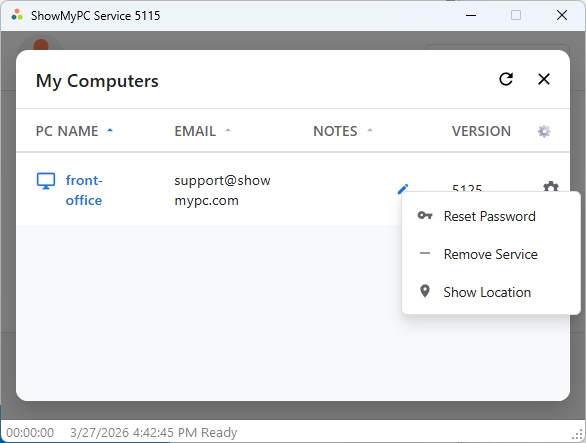
- Or you can change it via the PC service management link. The requested link will be sent to the email registered for that PC.
- This remote management feature is only available in the latest service versions.
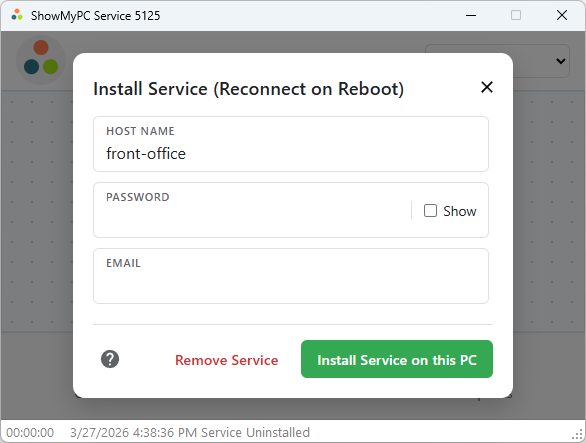
If you are physically in front of the computer where you want to uninstall the service:
- Go to the "Install Service" tab on the left navigation.
- Click the button to download and run the service application.
- Once the application interface opens, click on the "Remove Service" button.
You can remove the service entirely via the PC service management link.
- The requested link will be sent to the email associated with that specific PC.
- Note: When removing the service remotely, it may take up to 10 minutes for the PC to completely disappear from your dashboard list.
If you cannot reach your PC and need advanced help related to network connectivity, firewall settings, or anti-virus blocking, please visit our dedicated Advanced Troubleshooting Guide.